Two shapes, both with the marks.
- Table as shown · XLSX · one sheet, what is on screen
- Underlying data · CSV · one row per value, matches the API
- provenance on every industry row · vintage in the file
Paid plans. Nothing is stripped on the way out.
Five views of the same query: table, trend, concentration, compare, map. Estimated values are marked in every one of them. Everything below is the app as it runs today.
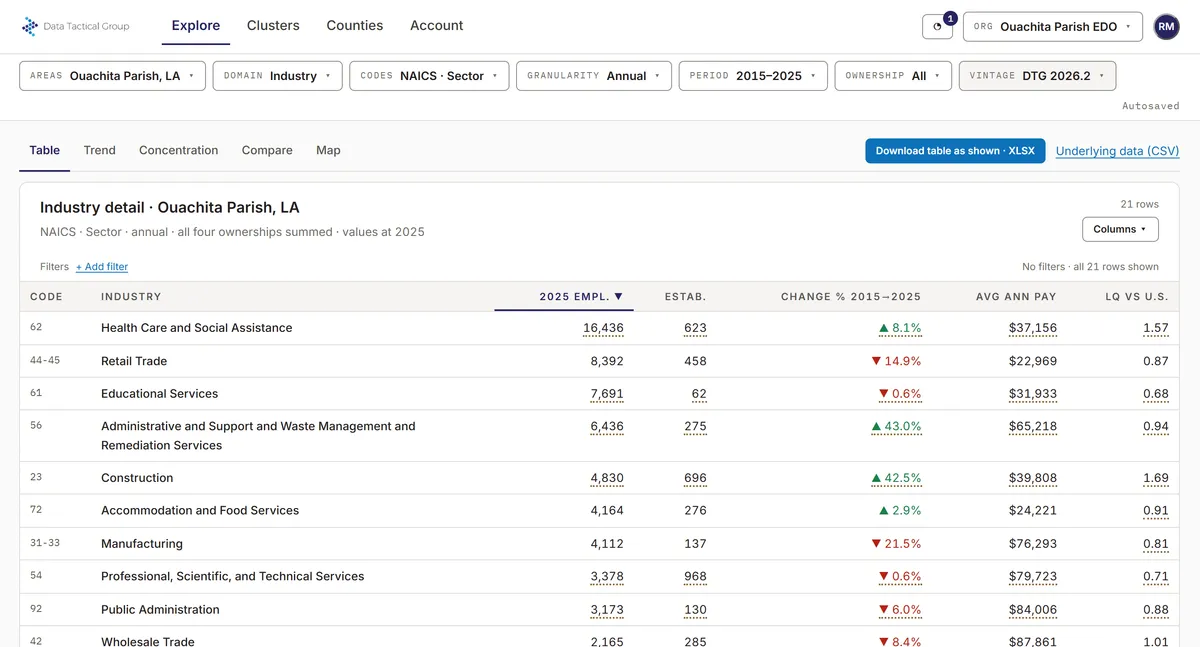
Table · Trend · Concentration · Compare · MapDotted underline = estimated valueThe table downloads as shownFigures in this picture are fabricated, not data
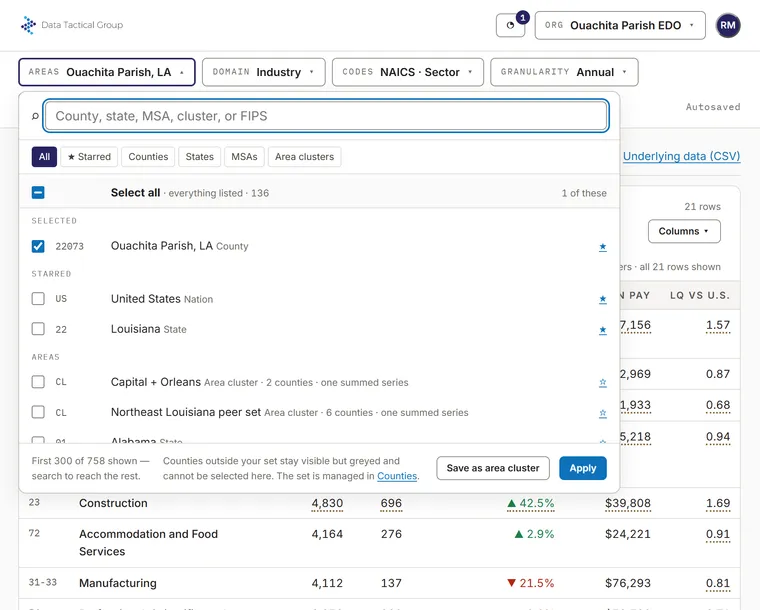
Search by county, state, MSA or FIPS. Star the places you return to. Group counties into an area cluster and read them as one summed series, across state lines if the market does.
How counties and plans work →Figures in this picture are fabricated, not data
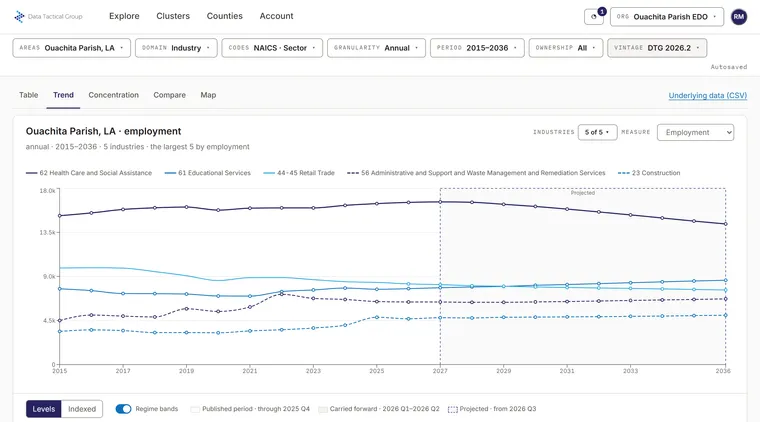
Trend one area's industries over time, and compare areas in the compare view. Regime bands separate published periods from carried-forward and projected ones, so nobody mistakes a model for an observation. The underlying data of a chart downloads as a CSV with the marks attached.
Figures in this picture are fabricated, not data
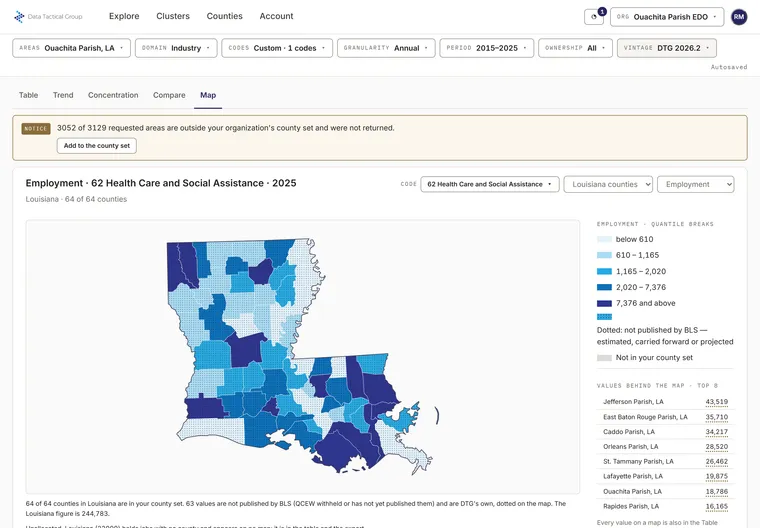
Your areas on a map, coloured by any of the measures the table has, with the largest values behind it listed beside it.
Figures in this picture are fabricated, not data
Paid plans. Nothing is stripped on the way out.
Every build is named and never edited. The current release and the two before it are retained, and every paid plan can select a prior one, so a report stays reproducible.
GET /v2/industry/series?areas=22073&naics=311

"data": [{ "period": "2025q4",
           "emp": 4123,
           "disclosure": "published",
           "reliability": 1 }]
An add-on to any annual plan. A sandbox for trying it with fabricated data is available. API docs →
A selection bar runs across the top of the app: areas, industry or occupation, codes at any level, annual or quarterly, period, ownership, and vintage. Areas can be counties, states, metropolitan areas, the nation, or a cluster you have saved. Codes can be a whole level of the classification, from sectors down to 6-digit industries or detailed occupations, or a list you pick.
The table beneath shows one row per series. Every industry value is marked with its disclosure code as a pattern, not only a color, and expanding a row shows the provenance sentence, the reliability score, and the quarterly values behind an annual figure. Counties outside your plan are shown, greyed, with the reason; nothing is hidden.
A trend chart draws one area’s history, one line per industry, with the periods shaded by regime: surveyed, carried forward from monthly survey data, and projected. A concentration view ranks location quotients against the nation for the codes you have chosen. A compare view sets several areas against one industry or occupation, as an index or as levels.
A choropleth shows one measure by county for the counties in your plan, with state values for everyone. The color ramp is the same blue sequence on every map.
Two exports. Download the table as shown, with its rounding, derived columns and sort order. Or download the underlying data as a long-format CSV: one row per series and period, the provenance columns beside every industry value, and a preamble naming the vintage and the provenance boundaries so the file explains itself. File export is on paid plans and is metered in points, one point per data value.
Everything the app shows is available as JSON or CSV from the same API the app uses, with the same provenance fields and the same vintage semantics. The API is an add-on to an annual plan, on every paid tier. The API documentation starts with a working request.
Save a set of industries, a set of occupations, or a set of counties as a named cluster and use it anywhere an area or a code is accepted. A cluster returns one summed series, labeled with its name. Clusters are free on every account, unlimited, and shared with everyone in the organization. A cluster that would double-count, by containing both a code and one of its descendants, is refused when it is saved, so a cluster can always be summed.
Location quotient is computed at query time from the underlying employment values and is included on every account. The derived measures page describes how it is calculated and what it can and cannot tell you.
Every release is a fixed, named version of the data: DTG 2026.3 is the third release of 2026. A released vintage is never altered; a correction is a superseding build with a revision marker. The current vintage is available to every account and the current release and the two before it are retained; prior vintages can be selected on every paid plan, so a figure cited six months ago can be retrieved exactly as it stood.
A subscription belongs to an organization. Members have seats; a colleague beyond the seat allowance still joins, on the free tier, and can be seated in one click. Owners and admins manage counties, members and seats; billing belongs to the owner and billing contacts; every member can build and use clusters.